Sky · TV / AI · ML Data Capture

UX as quality control: Building the interface that trains Sky's ML Model

Designing the capture interface that turns a living-room TV into a data-collection device for a computer-vision model, where every UX decision is a data-quality decision.

My Role
Lead UX Product Designer
Platform
TV App, Cherry camera
Status
Internal tool, Sky UK
Year
2023

UX as the quality-control layer for the dataset

The capture interface became the first quality gate in a five-stage ML pipeline. Treating every screen as a data-quality decision (not just a usability one) lifted training-footage consistency, reduced abandonment at known failure points, and reframed consent as participation.

Positioning variability dropped

Ready, Countdown, GO! gave users time to enter frame and settle, so videos reached the model in the correct starting position more reliably.

Recovery without abandonment

Errors mapped to pipeline stages (camera, network, upload, ingestion) gave users the right recovery action instead of a generic dead end.

Consent as participation

Framing consent as training-the-model participation, not legal friction, directly influenced dataset eligibility and opt-in rates.

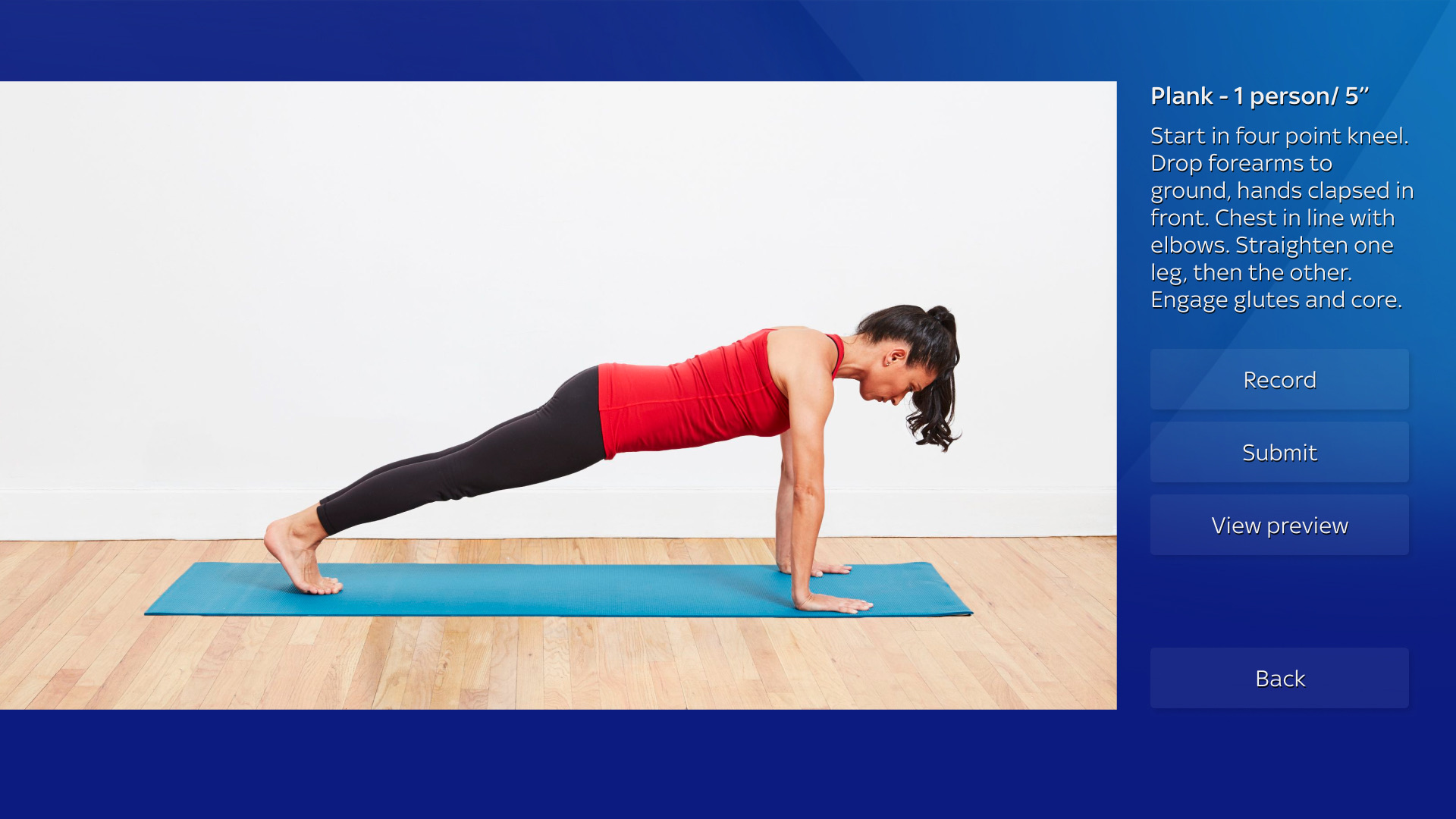
Sky Live ML capture interface in colour. Plank task in a living-room studio, with task panel showing Plank, 1 person, 5 second duration, and Record, Submit, View preview, Back controls.

The problem space

Sky was building a machine learning system that needed real people to record specific body movements to train a computer-vision model. The tool was a TV app running on Sky's Cherry camera. My job was to design the capture experience, where every UX decision directly determined whether a recording could be used for training or had to be thrown away.

The interface was, in effect, part of the pipeline.

Pipeline first, interface second

Understanding the technical architecture was essential to designing an effective experience. The system works end-to-end as five sequential stages, with UX sitting at the very top. The clarity of the capture interface determines whether the data that reaches the model is usable.

1 · Authentication

Auth0 sign-in connected to Sky's Azure AD. Consent is enforced as a hard gate before any recording begins.

2 · Task Assignment

Structured tasks: a movement or pose to perform, each with a name, duration, and step-by-step instructions.

3 · Capture

The Cherry camera auto-selects recording mode based on resolution and frame rate. Adaptive, not designer-driven.

4 · Upload

Recordings upload to AWS S3, triggering an async processing pipeline via EventBridge, Step Functions, and Lambda.

5 · ML Ingestion

Processed videos enter the ML training dataset, the final destination of every recording.

The constraints behind every screen

The capture interface was training a custom classifier built on top of Google's Pose Landmarker, a pre-trained model that maps 33 body landmarks (shoulders, elbows, hips, knees, ankles) in 3D coordinates. The Google model only tells us where people's joints are, it doesn't know what a plank is. Our classifier learns to recognise specific body positions from that landmark data, so every recording had to clear the upstream model first. Pose Landmarker has a confidence threshold of 0.5: frames where landmarks fall below that score are dropped entirely. It also requires full body visibility, works best from a side-on angle, and defaults to detecting one person.

Every task instruction is a landmark requirement in disguise.

Confidence ≥ 0.5 threshold

→ Camera-dominant layout. Users self-check positioning before recording so more frames clear the threshold.

Full body + side-on angle

→ "How to do the task" reference image. Teaches the framing the model needs, not just the movement.

Preparation time required

→ Ready, Countdown, GO! sequence. Users settle into the pose before capture, so the model gets high-confidence landmarks from frame one.

Single-person detection

→ "Plank, 1 person" task label. Task metadata mirrors model configuration, not just user-facing copy.

The capture flow

Seven states designed to reduce uncertainty, improve data quality, and give users confidence at every step.

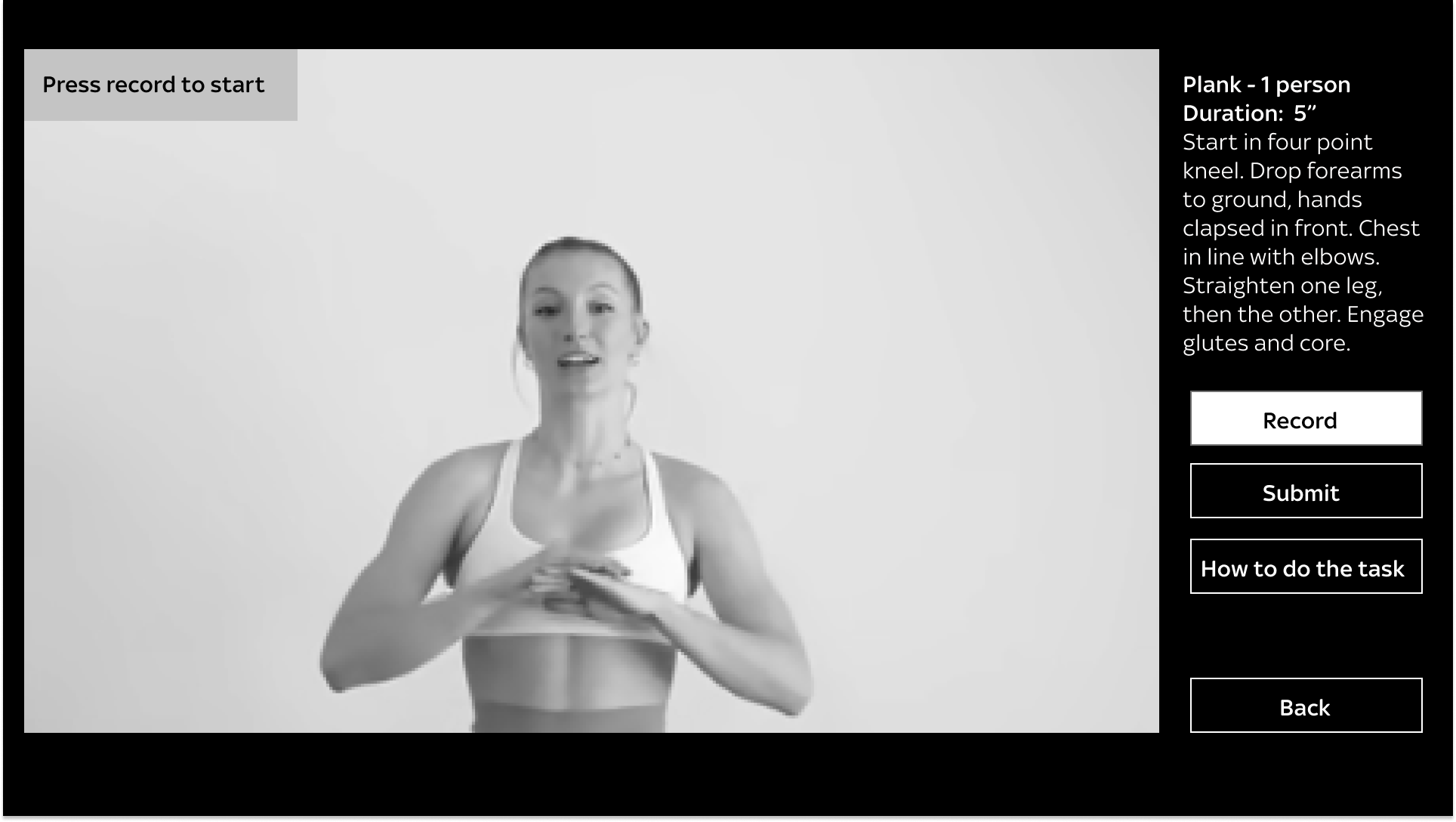
Screen 1 · Press record to start

The initial screen sets the split-screen layout: ~80% live camera preview, because what the camera sees is what the model trains on, and a persistent right-hand panel with task name, duration, and instructions. "How to do the task" is available as a pull, not a push, so confident users go straight to Record.

Sky Live ML capture, initial state. Live camera preview dominates the left, task panel with instructions and controls on the right.

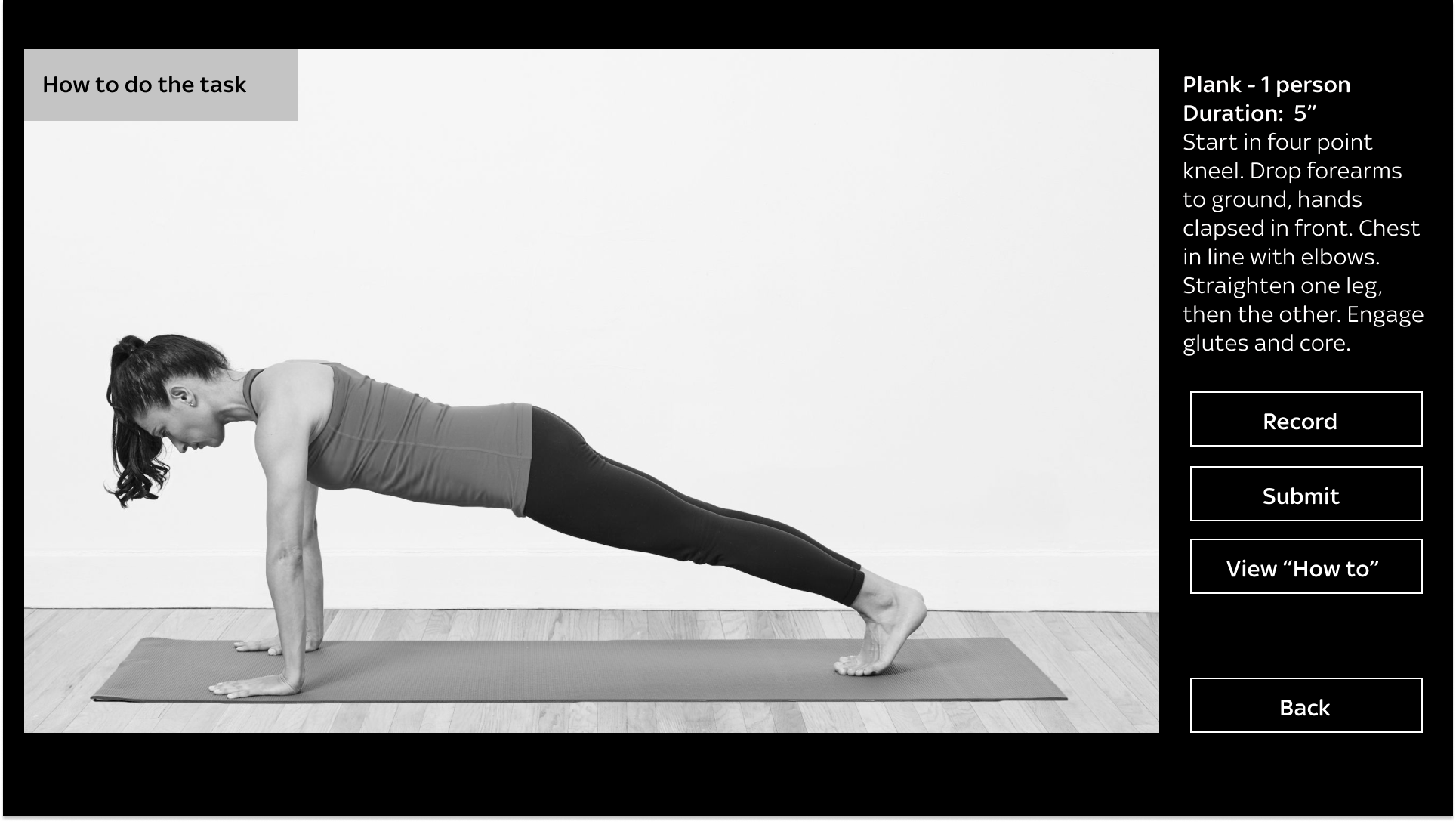
Screen 2 · How to do the task

Tapping "How to do the task" replaces the live feed with a reference photograph of the correct pose. Showing the ideal position teaches users what a good recording looks like before they make one, guidance that serves the pipeline as much as the person.

Reference image showing the correct plank position as a visual data-quality guide.

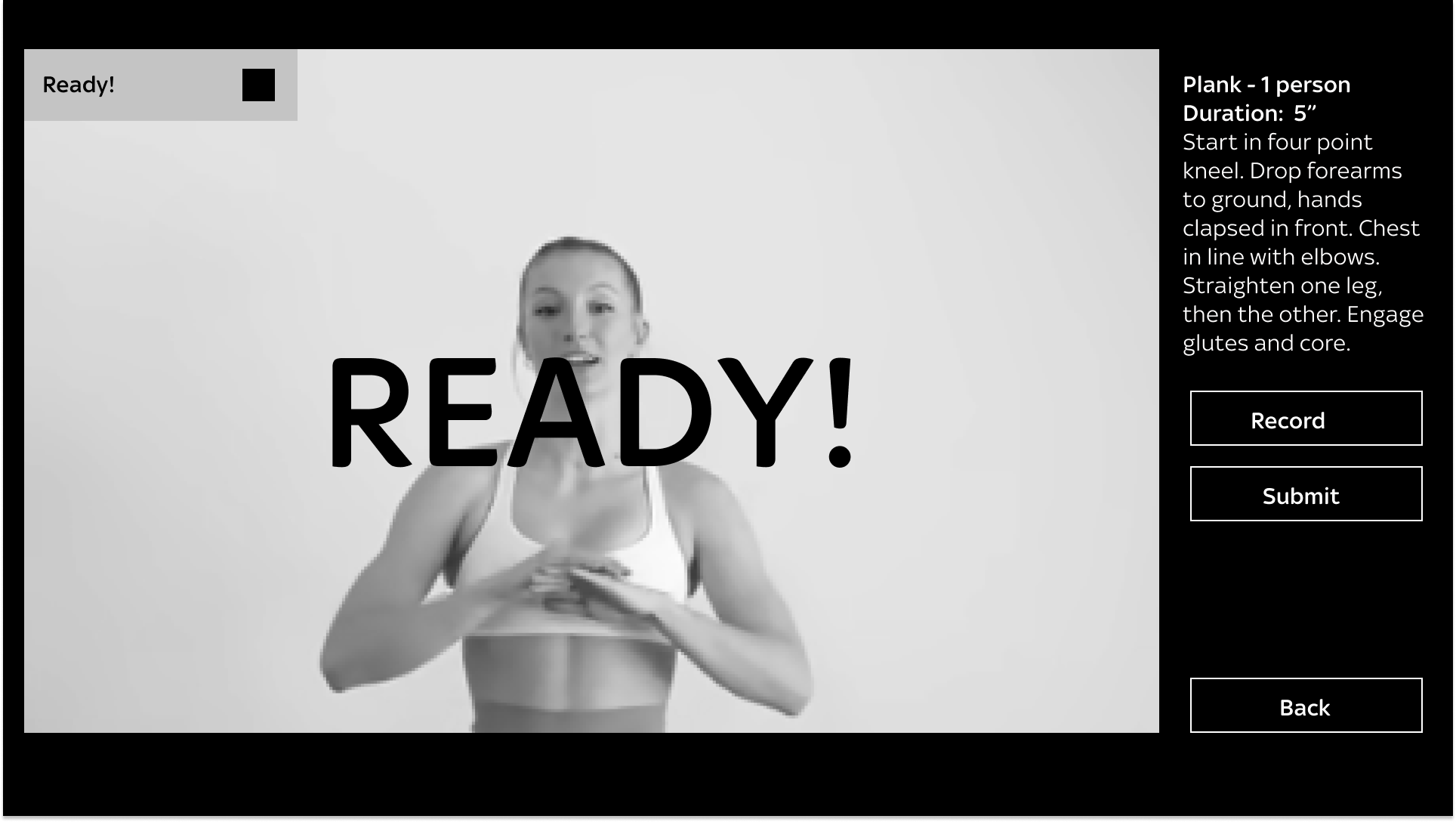
Screens 3 to 5 · Ready, Countdown, GO!

Borrowed from sports timing: "READY!" gives time to enter frame, the countdown gives time to settle, "GO!" removes ambiguity about when recording is active. Each phase prevents users from starting a recording out of position.

Ready! state. Large overlay prompts the user to position themselves in frame.

Screens 6 and 7 · Finished and Submitted

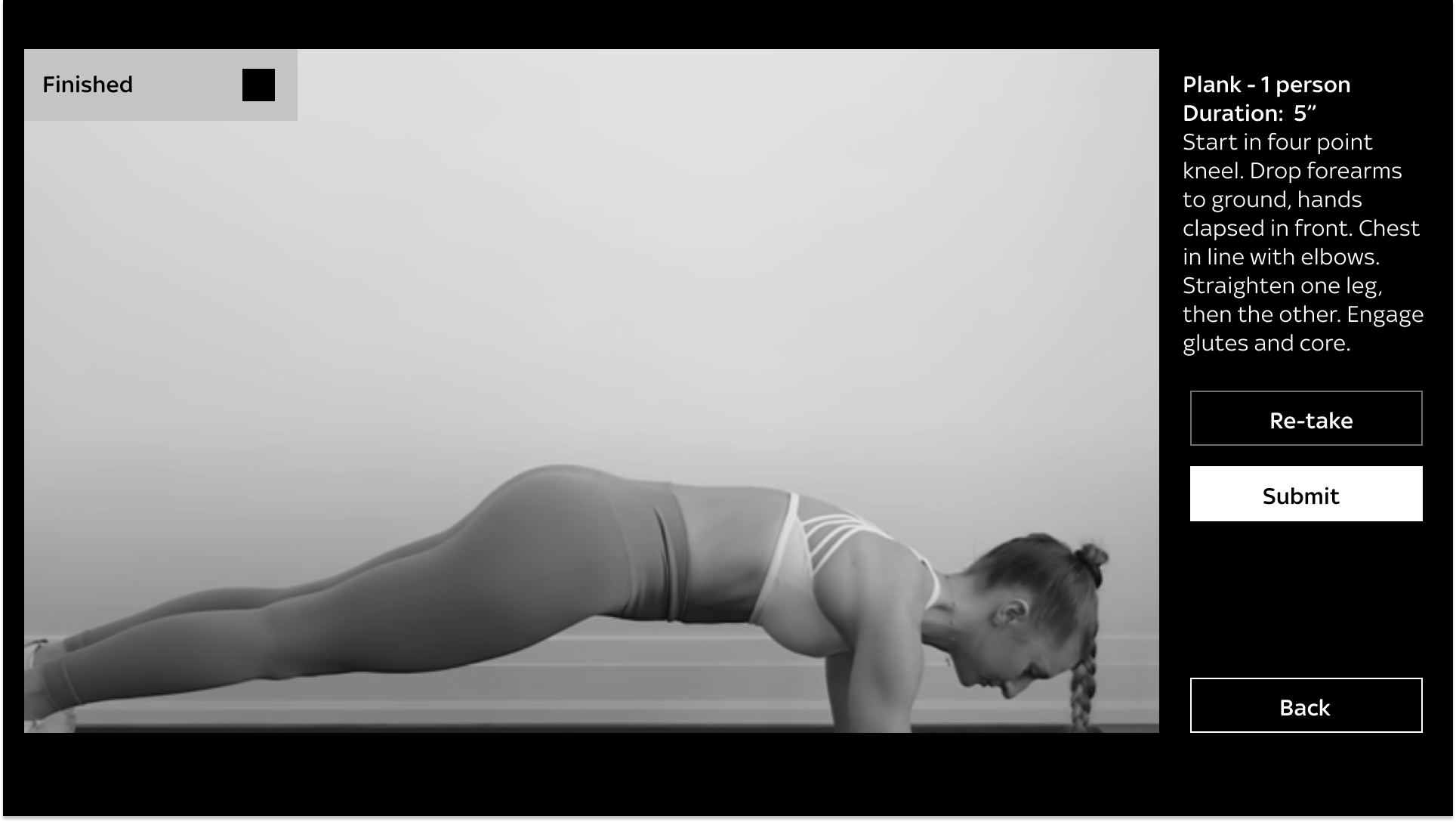
After recording, users see the final frame with two clear options: Re-take or Submit. Knowing they can try again means users are more likely to produce a higher-quality recording on the second attempt than to submit a bad one under pressure. "Your video is submitted" closes the loop.

Finished state. The final frame is shown with Re-take and Submit options.

Trade-offs between user friction and dataset integrity

Decision
Rationale
Impact
Camera-dominant layout
The camera view is what enters the ML pipeline. Keeping it central helps users self-correct their positioning in real time.
Reduced off-frame recordings; users treat the camera as their primary feedback.
Three-phase launch (Ready, Countdown, GO!)
Users need time to move into position before recording. A cold start produces off-frame or out-of-position data.
More consistent body positioning at the start of recordings.
Pipeline-aware error states
Generic errors cause abandonment. Errors mapped to pipeline stages (camera, network, upload, ingestion) give users the right recovery action at each failure point.
Higher recovery rate from camera, network, and upload failures.
Consent as purposeful participation
Consent is a hard gate before any recording. Framing it as participation in training the model, not legal friction, lifts opt-in and reduces drop-off.
Higher opt-in rate; users enter the flow with a clearer sense of why their data matters.

What I took from it

The user isn't simply a person completing a task, they're an operator in a pipeline. Their understanding, accuracy, and confidence directly affect the quality of the model being trained downstream.

System-aware UX

Designing to the pipeline's constraints produced better outcomes than designing from the user journey alone.

Mapping invisible failures

The highest-impact decisions mapped invisible system failures to clear recovery actions.

Teaching the user what the machine needs

Reference imagery, launch timing, and Re-take agency all implicitly taught users what good training data looks like.

The interface is part of the pipeline. Every design decision is a data-quality decision.

← Prev: Sky Live's Watch Together Next: Quick Access Menu →